



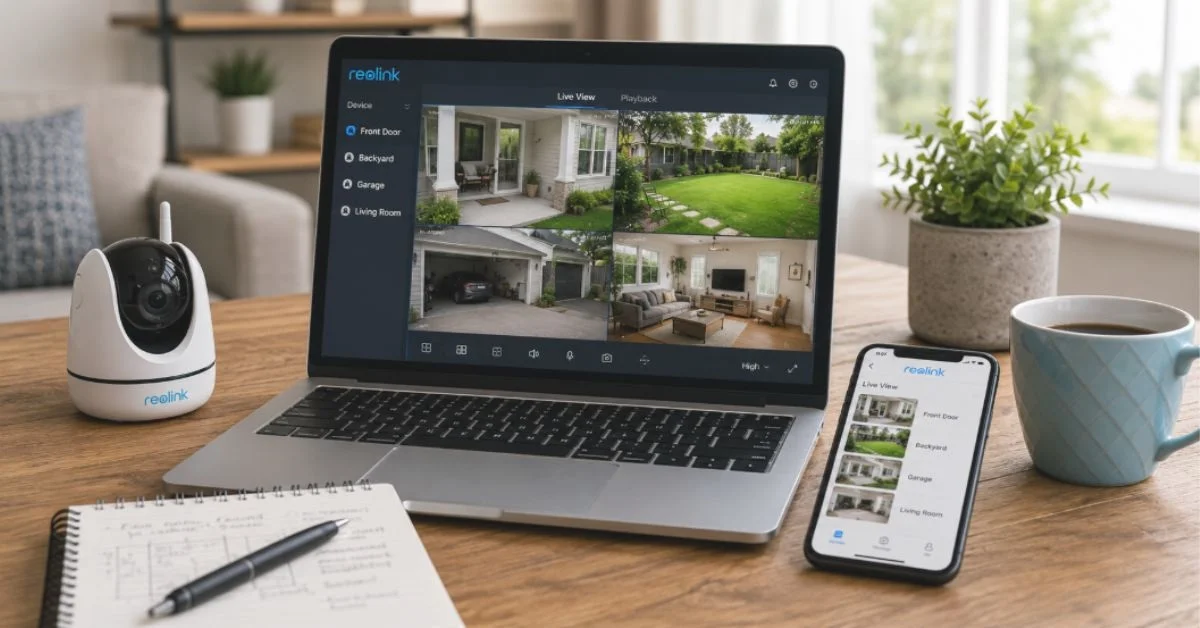
The Reolink app is a powerful mobile application designed to help users manage and control their Reolink security cameras, video doorbells, NVR systems, and other smart surveillance devices. It allows homeowners, business owners, and property managers to monitor their locations remotely, watch live footage, receive security alerts, and manage recordings directly from a smartphone. With a simple interface and support for a wide range of Reolink products, the app has become an important tool for people who want reliable security monitoring without complicated equipment.
reolink app Modern security cameras are no longer limited to recording videos locally. Users now expect instant access, smart notifications, and convenient control from anywhere. The Reolink app meets these needs by combining remote access, intelligent detection features, flexible storage options, and easy device management. Whether you want to check your home while traveling, monitor a workplace, or keep an eye on outdoor areas, the app provides practical features for everyday security needs.
What Is the Reolink App and How Does It Work?
The Reolink app is the official application used to connect and control Reolink security devices. It works as a central management platform where users can add cameras, adjust settings, view live streams, review recorded videos, and control different security functions. The app is available for Android and iOS devices, allowing users to manage their surveillance systems through mobile phones and tablets.
After connecting a compatible Reolink camera to the app, users can access their devices through a local network or remotely over the internet. The application communicates with the camera system and provides real-time access to video feeds and settings. This makes it easier to maintain security awareness without needing to stay near the physical recording equipment.
How to Install and Set Up the Reolink App
Setting up the Reolink app is designed to be simple, even for users who have limited technical experience. The first step is downloading the application from the appropriate app store and installing it on a smartphone. After opening the app, users can create an account or connect directly with their Reolink device by scanning a QR code or entering device information manually.
Once the camera is added, the app provides access to important configuration settings. Users can change cameras, adjust video quality, customize notifications, change recording preferences, and update device settings. Proper setup ensures that the camera system works smoothly and provides the type of monitoring experience the user needs.
The app also helps users keep their devices updated by supporting firmware updates. Keeping cameras and connected devices updated can improve performance, add new features, and help maintain a secure surveillance system.
Live Video Monitoring and Remote Access Features
One of the most useful features of the Reolink app is live video monitoring. Users can open the app and view real-time footage from their cameras whenever they need to check a specific area. This feature is especially valuable for people who want to monitor homes, offices, gardens, garages, farms, or other important locations.
The app supports high-quality video streaming, allowing users to view clear images from compatible Reolink cameras. Depending on the camera model, users may be able to access high-resolution video, night vision footage, and wide-angle views. The ability to adjust video quality also helps users maintain smooth streaming when internet conditions change.
For people with multiple cameras, the Reolink app makes it easier to manage different viewing locations from one place. Users can switch between cameras and monitor several areas without needing separate applications or systems.
Smart Motion Detection and Security Alerts
The Reolink app includes smart motion detection features that help users stay informed about activity around their property. When a camera detects movement, the app can send instant notifications to the user’s smartphone. This allows users to quickly check what is happening and take action if necessary.
Many Reolink cameras include artificial intelligence technology that can identify different types of movement, such as people, vehicles, or animals. This helps reduce unnecessary alerts caused by harmless activities like moving branches, changing light conditions, or small objects passing through the camera view.
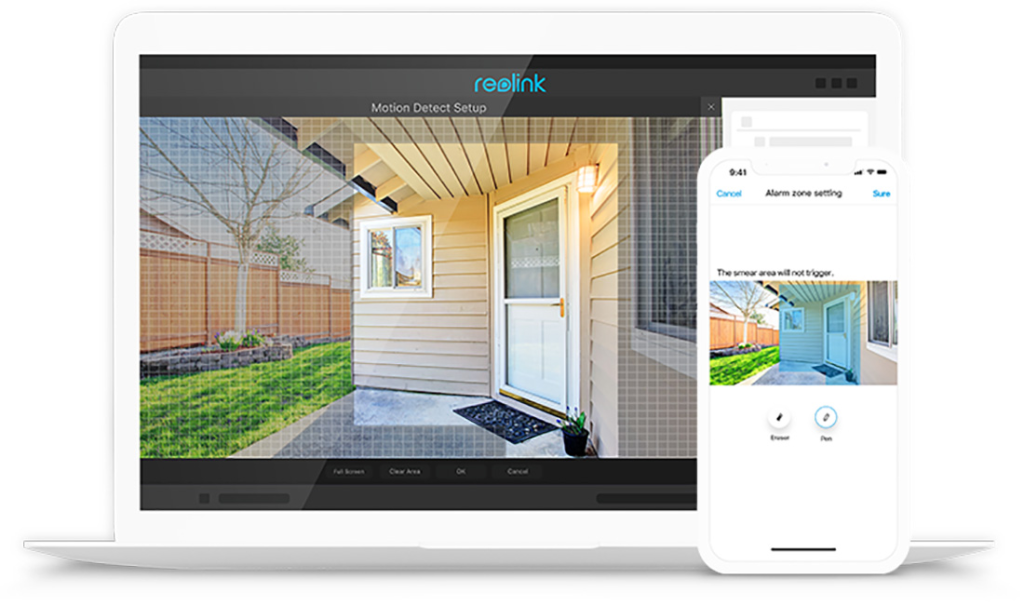
Users can customize motion detection settings according to their needs. They can adjust sensitivity levels, create specific monitoring areas, and control when notifications should be active. These options allow users to create a more personalized security system that fits their lifestyle.
Recording, Playback, and Storage Options
The Reolink app provides convenient access to recorded security footage. Users can review previous recordings stored on microSD cards, network video recorders, or other supported storage solutions. This makes it easier to investigate events, check missed activity, or save important video clips.
The playback feature allows users to search through recorded footage by selecting specific dates and times. Instead of watching hours of video manually, users can quickly locate important moments. Recorded clips can also be downloaded and shared when needed.
Storage flexibility is another advantage of the Reolink ecosystem. Users can choose different storage methods depending on their requirements, including local storage options and cloud-based services. Local storage provides direct control over footage, while cloud options offer additional backup convenience.
Privacy and Security Controls in the Reolink App
Privacy is an important consideration when using any smart security camera system. The Reolink app includes several features designed to help users protect their devices and control access. Users can secure their accounts with passwords and manage who can view their cameras.
The app allows users to share camera access with trusted family members, employees, or other approved users. This makes it possible to provide monitoring access without giving complete control over the entire system. Proper user management helps maintain privacy while allowing convenient collaboration.
Some supported Reolink devices also include privacy-related features that allow users to temporarily disable camera monitoring. These options give users more control over when cameras are active and provide additional comfort when privacy is required.
Advanced Features for Better Security Management
The Reolink app offers more than basic camera viewing. Depending on the connected device, users can access features such as two-way audio, spotlight control, alarm activation, and image adjustment settings. These tools make security cameras more interactive and useful for everyday situations.
Two-way audio allows users to communicate through compatible cameras. For example, homeowners can speak with visitors at the door, communicate with family members, or warn unwanted visitors. This feature adds an extra level of convenience and security.
The app also supports different camera controls, including adjusting brightness, changing viewing angles on compatible models, and managing built-in lights or sirens. These options help users customize their security setup based on their environment and preferences.
Reolink App Updates and Device Compatibility
Regular updates are an important part of maintaining a reliable security application. The Reolink app continues to receive improvements that enhance performance, improve compatibility, fix technical issues, and introduce new features. Keeping the app updated helps users receive the best possible experience from their security devices.
The application supports a wide range of Reolink products, including indoor cameras, outdoor cameras, wireless cameras, PoE cameras, video doorbells, and recording systems. This broad compatibility allows users to expand their security network over time while continuing to manage everything from one application.
As smart security technology develops, the Reolink app continues to adapt by improving usability and adding features that meet modern security expectations. Its combination of simplicity and advanced controls makes it suitable for both beginners and experienced users.
Conclusion
The Reolink app provides a complete solution for managing Reolink security cameras and surveillance systems. With features such as live monitoring, smart alerts, video playback, remote access, privacy controls, and device management, it helps users maintain better awareness and protection of their properties.
Its easy setup process and wide device compatibility make it a practical choice for different security needs, from small homes to larger business environments. By combining convenience with advanced security features, the Reolink app offers a reliable way to monitor important spaces anytime and from almost anywhere. For users looking for a flexible and user-friendly security camera application, the Reolink app remains a strong option in the smart surveillance market.
